- Page d'accueil /
- Jouets & jeux /
- Jouets éducatifs et d'apprentissage /
- Kits scientifiques éducatifs /
- Makeblock mBot2 Educational Coding Robot with Bluetooth...

0 ratings


Numéro d'article:
36775453
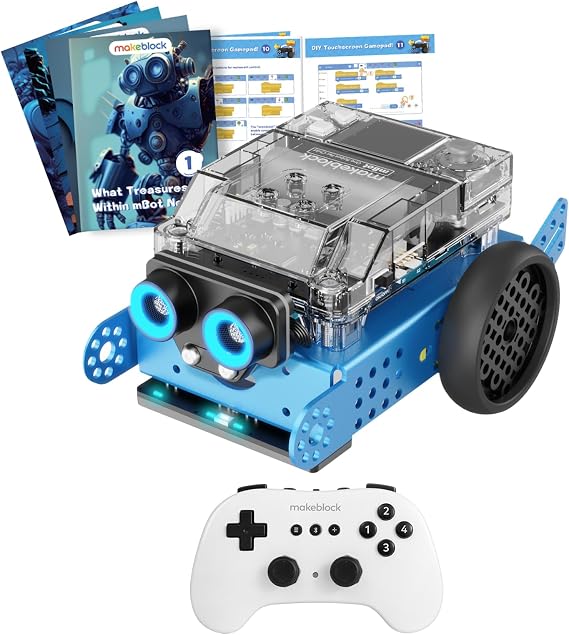
Makeblock mBot2 Educational Coding Robot with Bluetooth Wireless Remote Controller, Scrath and Python Programming in Classroom, AI and Technology
90% des répondants recommanderaient ceci à un ami
Numéro d'article:
36775453
XPF 34841
Détails du prix
Hors frais de livraison et de douane ( Les frais de livraison et de douane seront calculés lors du paiement )
*Tous les articles seront importés depuis États-Unis
0 ratings
Écrire un commentaire
En stock
 Importé depuis la boutique USA
QTY:
Commandez maintenant et recevez votre commande aux alentours du Monday, Novembre 09
Transaction sécurisée
Ubuy s'engage à protéger votre sécurité et votre confidentialité. Notre système avancé de sécurité des paiements garantit la confidentialité en chiffrant vos informations lors de la transmission grâce aux protocoles AES (Advanced Encryption Standards) et SSL (Secure Socket Layer). Vos coordonnées de paiement sont 100 % sécurisées car nous ne partageons pas vos informations de paiement avec des vendeurs tiers.
Nos meilleurs partenaires logistiques


Livraison
rapide

Retour
gratuit*

Emballage sécurisé

Produits 100 % originaux

Conformité PCI DSS

Certifié ISO 27001



Ce qui se démarque
Dual Programming Options
Supports Scratch and Python programming, allowing kids to seamlessly transition from visual coding to text-based coding, enhancing their coding skills and understanding of programming concepts.
Interactive Learning
Engages children with hands-on projects and real-time challenges, fostering creativity and critical thinking in technology and AI learning, making it fun and educational.
Bluetooth Connectivity
Equipped with a Bluetooth remote controller, enabling easy control and interaction with the robot from a distance, enhancing user experience and accessibility for classrooms or home learning.
Détails du produit
| Brand Name | Makeblock |
| Age Range Description | Kid |
| Educational Objective | Coding Skills |
| Set Name | mBot2 |
| Number of Packs | 1 |
| Number of Items | 1 |
| Model Number | mBot Neo |
| Manufacturer recommended age | 0 - 12 years |
| Theme | Robot,Robots |
| Material Type | Metal |
| Size | Medium |
| Item Weight | 3.5 lbs (1.59 kg) |
À qui est-ce destiné ?

-
Young Learners
Ideal for children ages 8-14, promoting early interest in coding and robotics through hands-on experience.
-
Educators
Perfect for teachers seeking innovative tools to incorporate programming and technology into their curriculum.
-
STEM Programs
Excellent for after-school STEM programs, fostering collaborative learning and problem-solving skills among students.

-
Advanced Coders
Not suitable for experienced programmers looking for complex coding challenges or advanced robotics functionality.
DESCRIPTION DU PRODUIT
Makeblock mBot2 Educational Coding Robot with Bluetooth Wireless Remote Controller, Scrath and Python Programming in Classroom, AI and Technology Learning for Kids
Vous avez une question ? Chattez avec nous
Questions et réponses des clients
-
question:
Comment acheter Makeblock mBot2 Educational Coding Robot with en ligne sur Ubuy ?
répondre: Il est facile d'acheter Makeblock mBot2 Educational Coding Robot with en ligne sur Ubuy.. Il vous suffit de rechercher le produit, de choisir votre mode d'expédition lors du paiement et de le faire livrer à votre emplacement. -
question:
Makeblock mBot2 Educational Coding Robot with est-il disponible pour effectuer des achats en ligne à French Polynesia ?
répondre: Oui, chez Ubuy French Polynesia, ce produit est disponible pour vous à un prix raisonnable.. Le Makeblock mBot2 Educational Coding Robot with n'est pas disponible localement mais vous pouvez nous faire confiance avec nos services d'expédition express. -
question:
Combien de temps faut-il pour obtenir le produit après avoir passé la commande ?
répondre: Le délai de livraison de votre produit commandé varie en fonction de ce que vous avez commandé et de la méthode d'expédition que vous avez choisie.. Le délai de livraison estimé est mentionné lors du processus de commande, alors soyez insouciant lors de vos achats.
Makeblock Science Kits & Toys mBot Neo Editorial Review
The Makeblock mBot2 Educational Coding Robot with Bluetooth Wireless Remote Controller engages kids in AI and technology learning while enhancing their coding skills through Scratch and Python programming. Designed for kids aged up to 12 years, this medium-sized robot is made of durable metal and features a rechargeable battery for endless play. Parents appreciate how this robot fosters creativity and problem-solving abilities in a fun, interactive way, making it a great educational tool for classrooms. Its user-friendly nature allows children to dive deep into coding and robotics effortlessly, sparking curiosity and innovation.
Avis et évaluations clients
1 évaluations des clients
-
5 étoile
100%
-
4 étoile
0%
-
3 étoile
0%
-
2 étoile
0%
-
1 étoile
0%
Donnez votre avis sur ce produit
Partagez votre avis avec d'autres clients
Avantages
- Enhances coding skills in a fun way
- Supports Scratch and Python programming
- Durable metal construction for longevity
- Rechargeable battery for continuous use
- Ideal for classroom and at-home learning
Les inconvénients
- May require adult supervision during initial setup
CONFIANCE EN LA PLATEFORME & PROTECTION DE L'ACHETEUR

DH
Diana
Acheteur vérifié
“I have, in fact, had bad experiences on several occasions with service providers or shipping companies from America—definitely—but this is the first and only reputable and reliable company I have encountered so far; huge praise for their work. ”
23 October 2026 · via Trustpilot
JS
Jarl
Acheteur vérifié
“Fast shipping and A+ product. ”
24 Oct 2026 · via Trustpilot
B
Botibita
Acheteur vérifié
“Great Range of Products and Excellent Service. The ordering and delivery process was excellent! I was able to purchase an item that I couldn’t find locally, and everything went smoothly from purchase to delivery. Thank you for the excellent service! ”
24 October 2026 · via Trustpilot
R
Agnes
Acheteur vérifié
“Reliable website, great articles. Timeline Mitopure Urolithin A Supplement Softgels is a wonderful product.”
25 October 2026 · via Trustpilot
C
Colin
Acheteur vérifié
“Great service from start to finish. ”
26 October 2026 · via Trustpilot
POURQUOI ACHETER CHEZ NOUS
Paiement sécurisé
Global Delivery
Retours faciles
Genuine Products
Historique des prix du produit
Informations importantes
- Limitations : Pour les produits expédiés à l'international, veuillez noter que toute garantie du fabricant peut ne pas être valide ; les options de service du fabricant peuvent ne pas être disponibles ; les manuels, instructions et avertissements de sécurité des produits peuvent ne pas être dans les langues du pays de destination ; les produits (et les matériaux qui les accompagnent) peuvent ne pas être conçus conformément aux normes, spécifications et exigences d'étiquetage du pays de destination ; et les produits peuvent ne pas être conformes à la tension et aux autres normes électriques du pays de destination (nécessitant l'utilisation d'un adaptateur ou d'un convertisseur le cas échéant). Il incombe au destinataire de s'assurer que le produit peut être importé légalement dans le pays de destination. En cas de commande auprès d'Ubuy ou de ses filiales, le destinataire est l'importateur officiel et doit se conformer à toutes les lois et réglementations du pays de destination.
- Tous les produits listés sur Ubuy ne sont pas à vendre, Ubuy étant un moteur de recherche mondial. Les produits sont soumis aux réglementations en matière d'exportation et de commerce.
XPF 34841
Commandez maintenant et recevez votre commande aux alentours du Monday, Novembre 09
This item is not restrict in my country.(Please click on above link if this item is not restrict in your country, So our team will review and allow.)
QTY:
Transaction sécurisée
Conforme PCI DSS et certifié ISO 27001:2022, avec des paiements chiffrés et une protection complète de l'acheteur pour chaque commande.
Nos meilleurs partenaires logistiques
Livraison transfrontalière la plus rapide
Assurance Ubuy
Profitez d'une expérience d'achat sereine avec des produits 100 % originaux, une sécurité de paiement conforme PCI DSS, une protection des données certifiée ISO 27001, la livraison transfrontalière la plus rapide, les retours gratuits* et un emballage sécurisé pour chaque commande.